
For furniture stores, home brands, custom furniture makers and textile suppliers
Sell furniture variants and combinations through 3D configuration.
Use the 3D Configurator for upholstery, wood and leg choices on one furniture item, and Modular Configurator for corners, seats and ottomans. Move from appearance to specific selections, with Shopify cart handoff or a defined arrangement for brand and factory inquiries.
- See upholstery across the complete piece
- Compare corner arrangements and companion furniture
- Explain connectors, assembly and furniture functions
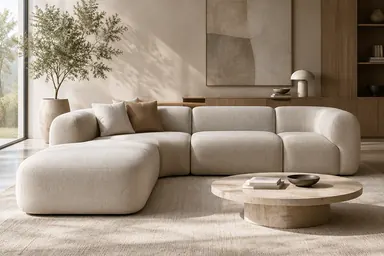
Help shoppers choose one piece and complete the set
Use the Configurator for one item and Modular Configurator for a set. Start with these selling decisions, then add textile presentation, construction explanations or assembly guidance where needed.
Core solution01
Turn upholstery choices into a specific furniture variant
How it supports furniture sales
Give each offered fabric a complete product view and help buyers choose a specific version. Shopify can accept its variant, reducing supplementary images and repeated explanations.
How the solution works
Switch offered upholstery, colors and leg variants on the same sofa or chair. Compare front, side and rear views, with choices mapped to variants of that product.
Capabilities used
- Options on one product
- Valid combinations and variants
- Configuration handoff
Core solution02
Combine corners, modules and ottomans into a purchasable set
How it supports furniture sales
Make ottomans, corners and modules a visible companion recommendation. Help buyers understand the additional purchase, retaining each Shopify variant and quantity.
How the solution works
Add separately sold seats, corners and ottomans to one scene using merchant-prepared placement points. Each product retains its variant and quantity in Shopify.
Capabilities used
- Cross-product selection
- Placement and connection rules
- Combined product list
Add the right products for further needs
Add material presentation, product selection, explanations or instruction to support further sales and handover needs.
Textile suppliers: compare material products on furniture
How it supports furniture sales
Help designers and purchasers shortlist specific textile products before sampling, then confirm physical color and feel to advance ordering discussions.
How the product page can show it
Use a fixed sofa or chair as the display object. Selecting a fabric, leather or finish product changes the material on the corresponding area.
Capabilities used
- Material product mapping
- Comparison in one scene
- Standalone and embedded views
Functional furniture: explain frames, storage and reclining
How it supports furniture sales
Explain price differences through frames, mechanisms and storage, giving customers a buying reason and dealers reusable sales material.
How the product page can show it
Use exploded views and prepared demonstrations to explain connectors, storage, back adjustment or reclining, with material and dimension details at the relevant parts.
Capabilities used
- Features and dimensions
- Structure and action explanations
Flat-pack furniture: identify parts and connection order
How it supports furniture sales
Turn repeated orientation and connection questions into steps people can pause and revisit, giving customers, assemblers and dealers a shared guide.
How the product page can show it
Present cabinet bodies, legs, connectors and module joining through brand-prepared steps explaining orientation and actions.
Capabilities used
- Steps and instructions
- Animation and part visibility
- Controlled teaching progress
Connect furniture selections to quotes and existing workflows
Start with software for selection and presentation, then choose services for custom furniture pricing, manufacturing materials or business integration where needed.
Custom cabinetry: connect choices to quotes and materials
How it supports the business
Give sales a consistent basis for quotation and engineering the agreed material information. Pricing, approval and system handoff are defined for the project.
When and how to use the service
Use Quote & Realtime BOM when cabinet materials, specifications, processes and quantities affect price. Assess the mapping between selections, pricing and manufacturing materials using factory-provided formulas and material codes.
Assessment inputs and delivery scope
Provide pricing formulas, material codes, sample BOMs and approval requirements; validate rule mappings and agreed quote and BOM examples.
Capabilities used
- Pricing rule assessment
- Manufacturing BOM mapping
- Approval and system handoff
Brand websites: hand choices to an existing inquiry flow
How it supports the business
Give sales the selected version to follow up, reducing repeated descriptions of fabrics and modules. Integration depends on agreed target-system interfaces.
When and how to use the service
Publish through a standalone link or SDK embed first. Use Integrations & API assessment if product variants and module quantities must also reach an existing inquiry or ordering system.
Assessment inputs and delivery scope
Provide the target page, result fields and receiving interface; deliver the agreed publishing or integration approach and acceptance checks.
Capabilities used
- Standalone links and SDK embeds
- Business integration projects
From liking a photo to choosing furniture
Appearance, combinations and practical concerns all need answers before shoppers can decide.
A fabric swatch does not show the whole sofa
How will the texture look across the seat, back and arms? Isolated product photos and small swatches leave the final upholstery choice unresolved.
Which corner, and which combination?
Left and right corners, single seats and ottomans are explained separately. Shoppers struggle to picture the overall shape, and sales repeatedly assemble image collages.
Hidden construction makes price differences harder to explain
Frames, connectors, reclining mechanisms and storage sit inside the furniture. Broad quality claims explain neither the price difference nor how to assemble and use the piece.
From upholstery to a sofa arrangement
An illustrative furniture shopping path. Stated dimensions aid comparison; shoppers measure their room and access route.
Choose the overall look
Compare upholstery and legs on the same sofa from the front and side.
Compare corner and seating combinations
Add separately sold corners, seats and ottomans to explore merchant-offered arrangements.
Review joining and use
Understand module connectors, leg assembly and functional mechanisms.
Furniture shopping and trade presentations
Consumers focus on combinations; dealers and designers also compare materials and ranges.
Shopify furniture stores
Use the main media area for upholstery variants and separately sold ottomans or modules, with combined cart addition. Explain functions and assembly further down the page.
Furniture makers, brands and textile suppliers
Share furniture or textile experiences with designers, dealers and purchasers to discuss appearance, arrangements and construction. Standalone links support presentations and inquiries without a cart or purchasing.
Use the configurator for finished furniture variants, swatches for material products and modular configuration for separate furniture modules. Physical samples, feel and site measurements remain the final reference.
Choose one furniture item and scope the products and quote
Bring a product link, upholstery variants, separate modules and common customer questions. Scope the software combination, model preparation, publishing route and any required services for a corresponding quote.